AI search monitoring tools: what a tracked prompt actually costs

The short answer
Something useful happened this year: almost every AI search monitoring tool started publishing its prices. So for the first time you can compare them on the only unit that matters, which is what it costs to watch one question on one engine for a month.
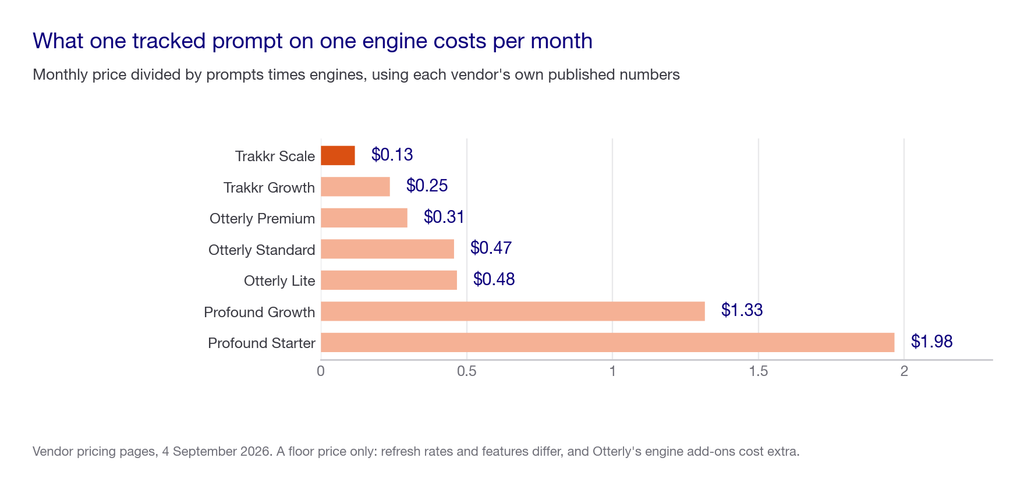
Do that and the field spreads by roughly 16x, from about $0.13 to about $1.98 per tracked prompt per engine.
Key takeaways
- Normalised per prompt per engine, Trakkr’s Scale tier is around $0.13, Otterly’s Premium around $0.31, and Profound’s Starter around $1.98.
- Profound Starter tracks ChatGPT only. At $99 for 50 prompts on one engine it is the most expensive entry point here per unit of coverage.
- Two vendors cannot be normalised at all. Scrunch does not publish prompt counts and AthenaHQ prices in credits, so neither can be compared on this axis. That is a finding, not an omission.
- This is a floor-price comparison, not a value comparison. Refresh frequency, agent analytics, crawler feeds and personas are real differences that a per-prompt number hides completely.
- Correction worth noting: Scrunch is widely described as SOC 2 certified. Its pricing page does not mention SOC 2. Ask them directly rather than trusting the roundups.
Where this comes from. We run organic for more than 250 enterprises at Pepper and track over 10 million prompts across every major engine, so we buy and retire this category constantly. Every price below was read off the vendor’s own pricing page on 4 September 2026.
Disclosure, because it matters on this page. Pepper sells in this category. We have put ourselves at the bottom rather than the top, and every number in the comparison comes from a competitor’s own published page rather than from us.
What is an AI search monitoring tool?
A tool that runs a set of questions against AI engines on a schedule. It records whether your brand is mentioned, whether your pages are cited, and who appears instead. The distinction between those two outcomes is the whole diagnostic, and we unpack it in Visibility, Citability and Retrievability.
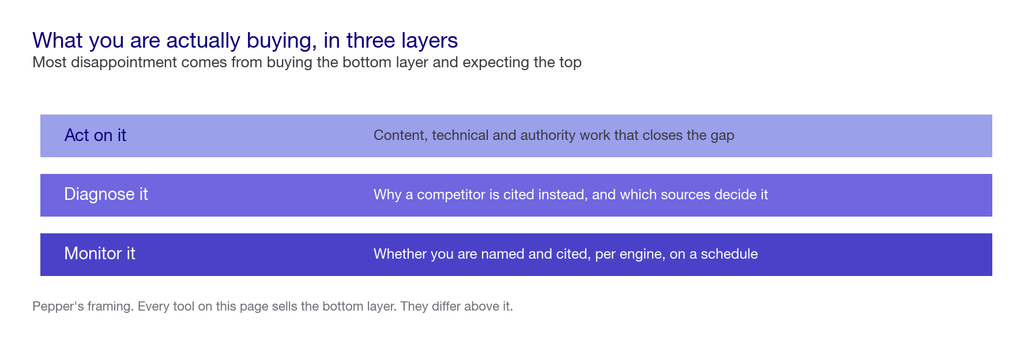
What you are buying stacks in three layers, and most disappointment comes from buying the bottom one and expecting the top.
See where you show up. Pepper’s GEO platform tracks Brand Visibility, Domain Prompt Presence and Share of Voice across ChatGPT, Perplexity, Gemini, Claude and Google AI Overviews. Your team can log in, connect Search Console and GA4, manage the prompt set and run your own agents in the Agent Atlas. A growth team works the same account alongside you. Book a growth audit or see where you show up.
The question nobody on this SERP asks
Every roundup compares features. None compares price on a common unit. Which is strange, because the unit is obvious: one prompt, on one engine, for one month.
Here is the arithmetic, using each vendor’s own published numbers.
| Plan | Monthly | Prompts | Engines | Cost per prompt per engine |
|---|---|---|---|---|
| Trakkr Scale | $500 | 500 (10 brands x 50) | 8 | $0.13 |
| Trakkr Growth | $100 | 50 | 8 | $0.25 |
| Otterly Premium | $489 | 400 | 4 | $0.31 |
| Otterly Standard | $189 | 100 | 4 | $0.47 |
| Otterly Lite | $29 | 15 | 4 | $0.48 |
| Profound Growth | $399 | 100 | 3 | $1.33 |
| Profound Starter | $99 | 50 | 1 | $1.98 |
Read the top and bottom rows together. Trakkr Scale watches a prompt on an engine for about thirteen cents a month. Profound Starter does it for about two dollars. That is a 16x spread inside one category.
Now the caveats, because this number is easy to misuse.
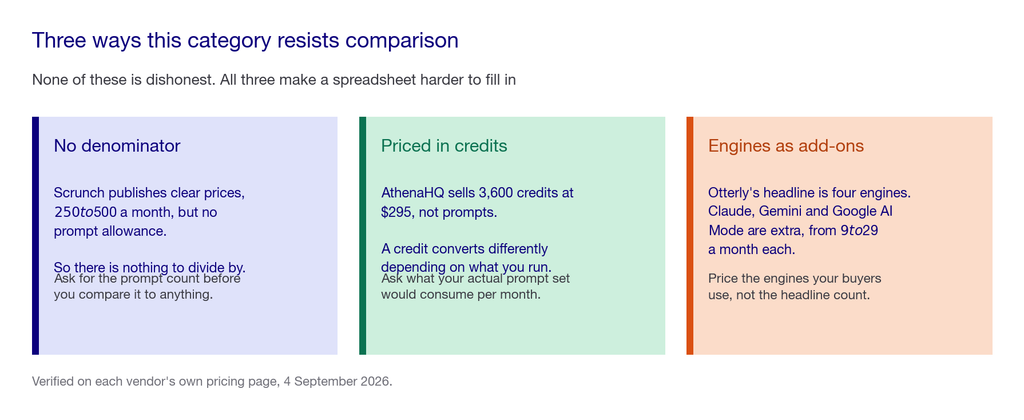
A prompt is not a standard unit. Refresh frequency differs: Otterly Lite and Trakkr both refresh daily, and Profound does not publish a frequency. Features differ enormously, and some of those differences are worth far more than the price gap. And Otterly’s headline four engines excludes Claude, Gemini and Google AI Mode. Those are paid add-ons from $9 to $29 a month, so its real cost per engine is higher than the table shows.
Treat this as a floor price. It tells you what you cannot pay less than, not what you should pay.
The two that cannot be compared this way
Scrunch publishes clear prices, $250 a month annually or $300 month-to-month for Starter, and $417 or $500 for Growth. It does not publish prompt allowances, so there is no denominator. Its seven engines are named: ChatGPT, Claude, Gemini, Perplexity, Google AI Mode and AI Overviews, and Meta.
AthenaHQ prices in credits, not prompts. Starter is $295 a month for 3,600 credits across ten models. A credit is not a prompt, and the conversion depends on what you run, so the comparison does not hold.
Neither is a criticism. It does mean that if price comparability matters to your procurement, two of the five biggest names cannot give you a number you can put in a spreadsheet.
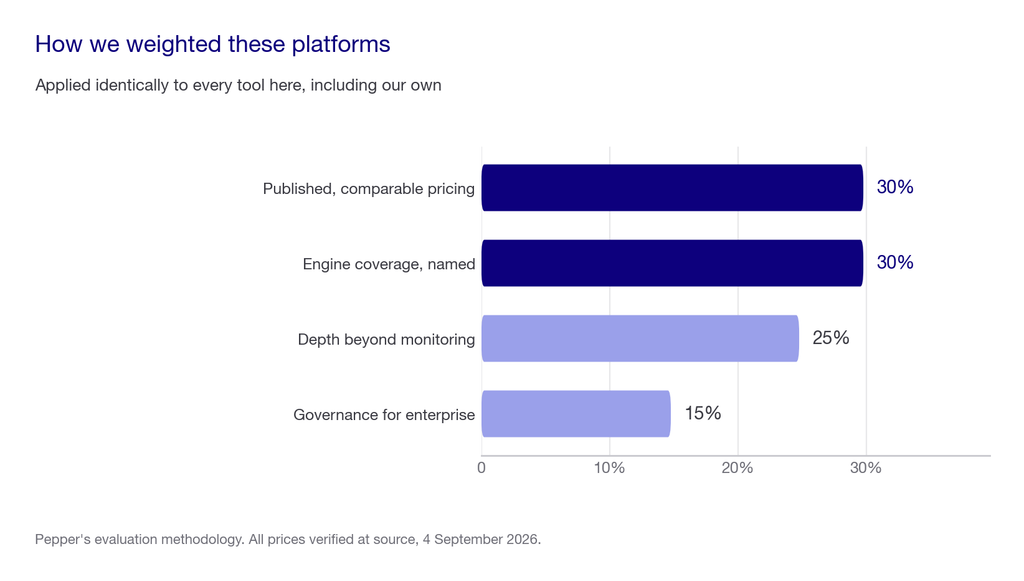
Our methodology: how we weighted these tools
| Criterion | Weight | What that means here |
|---|---|---|
| Published, comparable pricing | 30% | A price on the vendor’s own page, with a prompt count you can divide by. Credits and blank denominators score lower |
| Engine coverage, named | 30% | Engines listed by name, with add-on costs disclosed rather than hidden in a footnote |
| Depth beyond monitoring | 25% | Whether it diagnoses and acts, or only reports. A dashboard is the cheap half of the problem |
| Governance for enterprise | 15% | SSO, audit logs, data export and export-on-exit |
AI search monitoring tools at a glance
| Tool | Entry price | Prompts at entry | Engines | Strongest at | Where it falls short |
|---|---|---|---|---|---|
| Trakkr | $100/mo Growth | 50 | 8 | Raw value per tracked prompt, all models included at every tier | One brand at entry, and it is monitoring rather than execution |
| Otterly | $29/mo Lite | 15 | 4 base | The cheapest genuine entry point in the category | Claude, Gemini and AI Mode are paid add-ons, so headline engine counts mislead |
| Profound | $99/mo Starter | 50 | 1 at entry | Enterprise depth, agent analytics, up to 9 engines | Most expensive per prompt per engine at entry, and Starter is ChatGPT only |
| Scrunch | $250/mo annual | Not published | 7 | Agent traffic monitoring, page audits and personas | No published prompt allowance, and the widely repeated SOC 2 claim is not on its page |
| AthenaHQ | Free, then $295/mo | Credits, not prompts | 5 free, 10 paid | A genuinely free entry tier, and clean executive reporting | Credit pricing is hard to compare, and the free credits may not renew |
| Pepper | Custom | Custom | 5 | Tracking plus the team and agents that act on it | Not the right buy if you only want a dashboard and already have the people |
Prices read from each vendor’s own pricing page on 4 September 2026. Several are annual-billing rates and they move often.
The tools, one by one
Trakkr
The value pick, and the one that makes the arithmetic above look one-sided.
$100 a month for Growth buys one brand, 50 prompts and all eight models refreshed daily: ChatGPT, Claude, Gemini, Perplexity, Google AI Overviews, Grok, DeepSeek and Meta AI. Scale at $500 covers ten brands and 500 prompts. Enterprise starts around $790 billed annually.
Best for: teams who want the widest model coverage per dollar and are comfortable with monitoring alone.
Where it falls short: one brand at the entry tier, and there is a 14-day trial rather than a free plan, despite several lists describing it as free forever.
Otterly
The cheapest way into the category that is not a trial.
Lite is $29 a month for 15 search prompts with daily tracking across ChatGPT, Google AI Overviews, Perplexity and Copilot. Standard at $189 raises that to 100 prompts and adds API and MCP access plus Agent Analytics. Premium is $489 for 400 prompts. Enterprise starts around $1,000.
Best for: a small team that wants a real ongoing baseline for the price of a couple of lunches.
Where it falls short: the engine list. Claude, Google AI Mode and Gemini are add-ons from $9 to $29 a month, so a four-engine headline becomes a seven-engine bill.
Profound
The enterprise pick, and the one that costs the most per unit at the entry tier.
Starter is $99 a month for 50 prompts tracking ChatGPT only. Growth at $399 covers 100 prompts across ChatGPT, Perplexity and Google AI Overviews. Enterprise reaches up to nine engines with tailored prompt volumes.
Best for: enterprises that need agent analytics, prompt volume analysis and the widest engine list at the top end.
Where it falls short: a single-engine entry tier is hard to justify in 2026 when the engines differ by more than 40 points in how often they cite anyone. We covered that spread in the top AI search engines.
Scrunch
The one with the most interesting scope and the least comparable pricing.
Starter is $250 a month billed annually, or $300 month-to-month. Growth is $417 annually or $500 month-to-month. Beyond monitoring it offers Prompt Manager, Citations, Page Audits, Key Topic monitoring, agent traffic monitoring and Personas, across seven named engines.
Agent traffic monitoring is the genuinely differentiated piece: watching what AI crawlers do on your site rather than only what engines say about you. If crawler access is your problem, that matters. Ours on the technical side is in can AI bots crawl your site.
Where it falls short: no published prompt allowance, so you cannot price-compare it. And the SOC 2 certification widely attributed to it does not appear on its pricing page. Its published security features are Google SSO on all plans and SAML or OIDC on Enterprise.
AthenaHQ
The only one here with a real free tier rather than a trial.
Essential is free, giving a $25 credit worth roughly 300 credits across five engines, with unlimited team members, prompt and response analysis, sources and competitor insights. Starter is $295 a month for 3,600 credits across ten models. Enterprise adds a knowledge base, discrepancy detection, SSO and audit logs.
Best for: running a proper baseline before you spend anything, and clean reporting upward.
Where it falls short: credits are not prompts, so budgeting is harder than it looks, and the page does not state whether the free credits renew. We put it top of the free list in the best free AI search tools for exactly that reason.
Where Pepper sits, and where it does not
Pepper is not another AEO tool, and we do not want you buying it as one.
The products above are built to measure AI search visibility. Pepper is an organic growth partner. We use the signals from AI search, traditional search and your broader organic performance to determine what needs to change, then our team does the work to improve it.
That means Pepper sits one step beyond the AEO tool category. The question is not whether you can see your Share of Voice, prompt presence or citations. The question is whether someone has the strategy, content and execution capacity to move those numbers.
Pepper combines the technology to identify the opportunities with a growth team that acts on them. Customers get the platform, but they are also getting people responsible for turning the diagnosis into organic growth.
Where Pepper is the right fit: when the bottleneck is not measurement but execution, and your team does not have the hours or specialist capacity to close the gaps the tools are showing you.
Where Pepper is not the right fit: if you already have a strong organic team and simply need a monitoring dashboard. In that case, buy the tool. At $100 a month for eight models, Trakkr is better value than anything we would sell you for monitoring alone, and we would say so on a call.
The simplest way to think about the category is this: the tools tell you where you stand. Pepper helps you move.
What does AI search monitoring cost?
| What you are buying | Verified 2026 price | What it covers |
|---|---|---|
| First-party reporting | Free | Search Console and Bing Webmaster Tools, permanently |
| A baseline, once | Free | AthenaHQ Essential credits, five engines |
| Entry monitoring | $29 to $100/mo | Otterly Lite or Trakkr Growth |
| Real prompt volume | $189 to $500/mo | Otterly Standard or Premium, Trakkr Scale, Scrunch Growth |
| Enterprise coverage | $399/mo and up | Profound Growth to Enterprise, up to nine engines |
| Platform plus a team doing the work | Custom | Tracking, plus the content, technical and authority work it points at |
The pattern we see repeatedly: teams buy the $400 tier, get a dashboard nobody opens after week three, and have not budgeted a single hour to act on it. Monitoring is the cheap half of this problem, and the expensive half is covered in how to get cited in LLMs.
How to evaluate an AI search monitoring tool
Start from what you will do with the number. If the honest answer is “report it upward”, buy the cheapest thing that covers your engines.
The scorecard
Score each candidate out of 100.
| Factor | Weight | How to score it honestly |
|---|---|---|
| Cost per prompt per engine | 30% | Divide the monthly price by prompts times engines. If you cannot, that is information about the vendor |
| Engine coverage after add-ons | 25% | Price the engines your buyers actually use, including paid add-ons, not the headline count |
| Refresh frequency | 15% | Daily and weekly are different products at the same price. Ask, because not everyone publishes it |
| What happens after the dashboard | 20% | Whether anything in your organisation is resourced to act on what it shows |
| Export and exit | 10% | You can get your history out. A year of tracking you cannot export is a year you will repeat |
The live test, over 90 days
Fix 30 prompts in your buyers’ words before you take a single demo. Real questions, such as “what are the best AI search monitoring tools”, “how do I track brand mentions in ChatGPT”, “which platform tracks Claude and Perplexity together” and “is Profound worth it compared to Scrunch”.
Hand the identical list to every vendor on your shortlist. Ask each to show you, inside the trial, where you appear today, which competitors appear instead, and which sources are influencing those answers.
Then run the same 30 yourself, monthly, for 90 days. Three readings is the shortest honest window. One is a snapshot, two could be noise, three shows direction. Keep the set fixed, because changing it resets the comparison.
This does two things at once. It tells you whether each vendor’s numbers match what you can see with your own eyes, and it stops you buying volume you will not use.
Weak approach versus strong approach
The weaker approach starts with a roundup. Sit four demos, buy the tool with the best dashboard, then discover the entry tier covers one engine and the prompts you care about need the tier above.
The stronger approach: count your prompts and name your engines first. Compute cost per prompt per engine across the shortlist. Buy the cheapest tool that clears both numbers, and spend the difference on someone to act on the output.
The difference is which end you start from. The weak version starts at the vendor’s framing. The strong version starts at two numbers you can write down in an afternoon.
Red flags
- A roundup published by a tool on the roundup. Several of the highest-ranking articles for this keyword are vendor blogs ranking themselves.
- Engine counts that exclude add-ons. Otterly’s four becomes seven only if you pay more.
- Prompt allowances quoted without refresh frequency. Fifty prompts daily and fifty weekly are different products.
- A single blended visibility score. It hides the named-versus-cited gap, which is the diagnostic half.
- Certifications you cannot find on the vendor’s own site. The SOC 2 claim attached to one tool here is not on its pricing page.
- No published prompt allowance. Not disqualifying, but it means you cannot price-compare, and you should ask why.
Five questions worth asking
- “How many prompts, on which named engines, refreshed how often?” Three numbers. Anything vaguer is marketing.
- “Which engines cost extra?” This is where headline coverage comes apart.
- “Can I export my full history, and what happens to it if we leave?” Ask before you have a year of data in there.
- “Show me a query where a competitor is cited and explain why.” Separates retrieval understanding from dashboard reselling.
- “What would you tell us not to buy from you?” A good rep answers it. A weak one upsells.
Reduced to one principle: buy monitoring on cost per prompt per engine, then spend what you saved on acting. The dashboard is the cheap half of this problem and the easy half to sell.
One closing note that costs us something. If all you need is a dashboard, Trakkr at $100 for eight models is better value than what we would sell you. Every platform in this category is priced for the buyer it wants rather than the buyer you are, ours included. Ask each of us what we are worst at.
What nobody should promise you
A guaranteed citation or a fixed position in an AI answer. Nobody controls generated output, and Google warns against providers guaranteeing rankings.
That a monitoring number is precise. Ask any engine the same question five times and the sources move, so a single run is a sample.
A single AI visibility score that means something on its own. There is no universal good number. Trend on a fixed prompt set and distance from the category leader carry the information.
Full coverage of Microsoft Copilot inside enterprise tenants. That usage is not visible to any external tool, including ours.
When you should not buy monitoring at all
The answer that costs us the sale. Has anybody in your organisation booked time to act on what the dashboard says? If not, you do not need a monitoring platform yet, and we would tell you not to buy one.
Use Search Console and Bing Webmaster Tools, which are free, and run 30 prompts by hand once a month. That costs two hours and it produces the same decision. Buy software when the manual run stops fitting in an afternoon, or when someone asks for history you did not capture. Those are the only two honest triggers.
Frequently asked questions
What are the best AI search monitoring tools in 2026?
Trakkr offers the widest model coverage per dollar and Otterly the cheapest genuine entry at $29 a month. Profound has the deepest enterprise features, Scrunch the best agent traffic monitoring, and AthenaHQ the only real free tier. The right one depends on your prompt count and engine list.
How much do AI search monitoring tools cost?
Entry plans run from $29 a month for Otterly Lite to $250 for Scrunch Starter. Normalised per tracked prompt per engine the range is roughly $0.13 to $1.98, a 16x spread, using each vendor’s own published prompt counts.
What is the cheapest AI search monitoring tool?
Otterly Lite at $29 a month for 15 prompts across four engines is the cheapest ongoing plan. Trakkr Growth at $100 for 50 prompts across eight models is cheaper per prompt per engine and is usually the better buy.
Which AI search monitoring tool covers the most engines?
Trakkr includes eight models on every tier. Profound reaches up to nine on Enterprise. Scrunch names seven, and AthenaHQ ten on its paid tier. Check whether engines are included or sold as add-ons before comparing these counts.
Is Profound worth it compared to cheaper tools?
It depends on whether you need agent analytics and enterprise engine coverage. Its Starter tier tracks ChatGPT only at $99 for 50 prompts. That is the most expensive entry here per prompt per engine, so buy Profound for the top-end features rather than as a cheap way in.
Do these tools track Claude and Perplexity?
Coverage varies and add-ons matter. Trakkr includes eight models on every plan. Otterly covers four as standard, selling Claude, Gemini and Google AI Mode separately from $9 to $29 a month. Profound covers ChatGPT only at entry.
Is Scrunch SOC 2 certified?
It is widely described as such, but SOC 2 does not appear on its pricing page. That page lists Google SSO on all plans and SAML or OIDC on Enterprise. Ask Scrunch directly if compliance is a procurement requirement.
Do I need a monitoring tool if I already have Search Console?
Not immediately. Search Console covers Google’s AI surfaces with your own first-party data and is free. You need a platform when you want the other engines, more prompts than you can run by hand, or history you did not capture.
Where to go next
Before you take a demo, write down two numbers: how many prompts you actually want tracked, and which engines your buyers actually use.
Those two numbers turn this comparison into arithmetic, and they eliminate most of the shortlist in about ten minutes.
Book a growth audit · Compare the free options · See the work in our case studies · Explore Pepper’s platform
Sources and further reading
- Pepper. The best free AI search tools, for everything below the paid tier, and how to measure AI search visibility without expensive tools for the manual method.
- Pepper. AI search metrics: what to track and what to ignore, on reading these numbers once you have them.
- Deliberately excluded: Scrunch’s SOC 2 status and prompt allowances, Profound’s refresh frequency, and whether AthenaHQ’s free credits renew. None is published on the vendor’s own page, and we have written them as questions to ask rather than filling the gaps.
Latest Blogs
Most advice on this is inference dressed as fact. OpenAI documents exactly one thing clearly, which is access. Here is what is documented, what is inferred, and how to verify the rest for yourself.
Being named in an AI answer and having your page used as its source are different outcomes with different causes and different fixes. The gap between them is the most useful diagnostic in AI search, and most reporting collapses it into one number.
Every platform reports share of voice and almost none of them define it the same way. Here is the definition worth using, the three choices that change the number, and how to measure it yourself without buying anything.
Get your hands on the latest news!

Similar Posts
GEO / AI Search
10 mins read
How to get cited by ChatGPT
GEO / AI Search
10 mins read
Mentioned vs cited: the difference that decides AI visibility
GEO / AI Search
13 mins read