How do I know if AI search is sending me traffic? A GA4 and Search Console guide
Google added AI reporting to both of its free tools this year. The two reports answer different questions, and they cannot be joined.
The short answer
You can now see AI search in Google’s own tools, but only partially, and the two views do not meet in the middle.
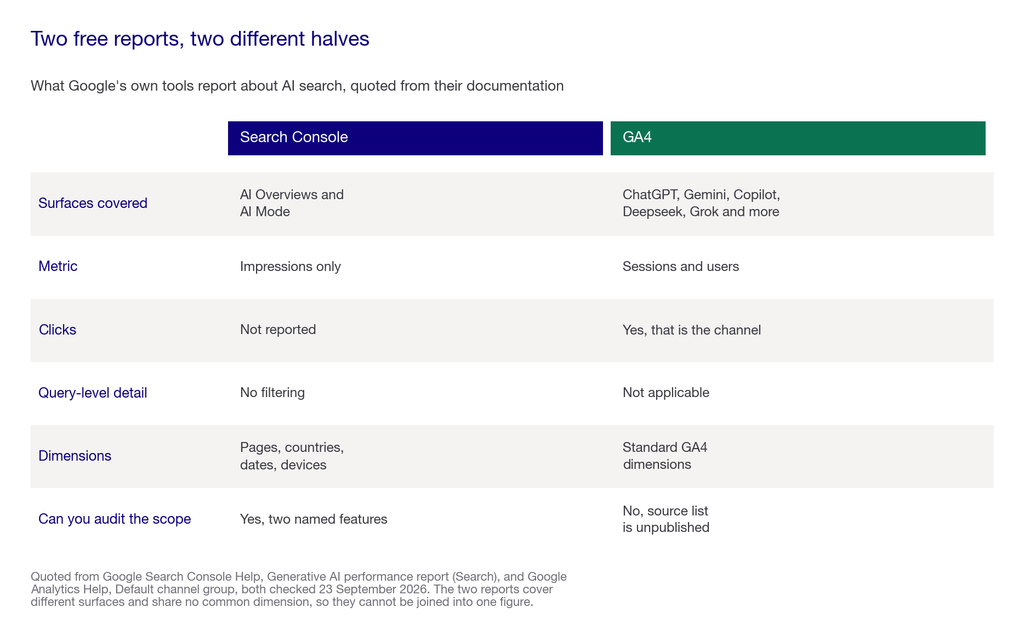
- Search Console tells you that you were shown. Its generative AI performance report covers AI Overviews and AI Mode. It reports impressions only, defined as “how many times links to your site were shown to a user in a generative AI feature.” No clicks, no position, no query filtering.
- GA4 tells you that someone arrived. There is now an AI Assistant channel in the default channel group, described by Google as “the channel by which users arrive at your site from sources like ChatGPT, Gemini, Deepseek, Copilot, or Grok.”
- Neither report covers the other’s ground. Search Console shows Google’s own AI surfaces without clicks. GA4 shows clicks from third-party assistants without impressions. There is no view that shows both sides of the same journey.
There is also a gap you should know about before you build anything on it. Google does not publish the list of sources it counts as an AI Assistant, so you cannot audit what is inside or outside that channel.
This page walks through how to set both up, what each one can honestly support, and the three checks that tell you whether your numbers are real. We run this work daily. Pepper is an agentic organic growth engine, not an SEO agency, and this page comes out of organic run for more than 250 enterprises across eight years and more than 10 million tracked prompts. Customers log in and run the platform themselves, with a Pepper growth team attached. Book a growth audit and we will set the baseline these reports measure against.
Key takeaways
Key takeaways from an afternoon inside Google’s own analytics and Search Console documentation.
- Search Console’s generative AI report is impressions only. It covers AI Overviews and AI Mode, with dimensions for pages, countries, dates and devices. There is no click metric and no query-level filtering.
- GA4 has an AI Assistant channel that sets medium to
ai-assistantand campaign to(ai-assistant)when the referrer matches Google’s internal list. - That list is not published. Google names ChatGPT, Gemini, Deepseek, Copilot and Grok as examples, and says the medium is set “if the referrer matches a list of AI Assistants.” The full list is internal.
- Not every site has the Search Console report yet. Google states “Not all properties have access to the report, as we’re rolling out over time,” and sites need enough impressions to qualify.
- Custom channel groups need reordering. If you built your own AI grouping, AI Assistants has to sit above Referrals or traffic falls into the wrong bucket.
- Referral data undercounts by design. Most AI answers resolve without a click at all, so low referral numbers are not the same as low visibility.
What is AI search traffic, and what can actually be measured?
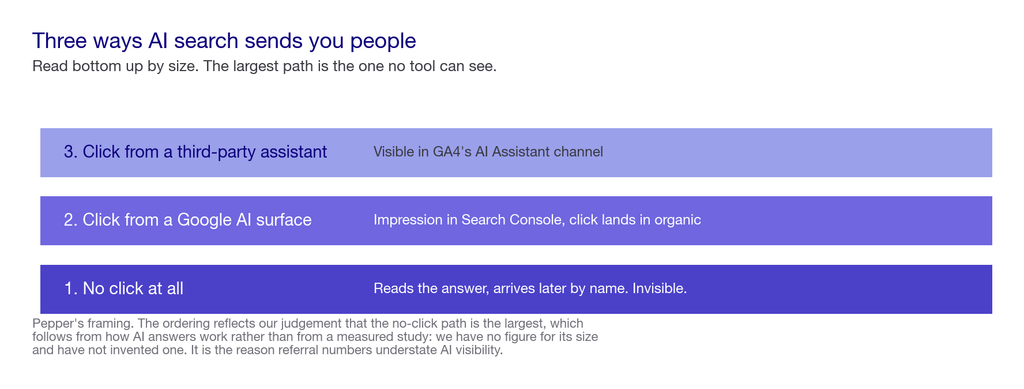
AI search traffic is any visit that begins inside an AI answer rather than a list of links. In practice it arrives three different ways, and only two of them are visible to you.
- A click from a third-party assistant. Someone asks ChatGPT, it cites you, they click. This appears in GA4, as a referral or in the AI Assistant channel.
- A click from a Google AI surface. Someone sees you in an AI Overview or AI Mode and clicks through. Search Console counts the impression. The click lands in your normal organic numbers rather than in a separate AI bucket.
- No click at all. Someone reads the answer, learns your product exists, and arrives later by typing your name or via a search. Nothing attributes this to AI search, and it is probably the largest of the three.
Where it falls short. Everything below measures the first two. The third is real and unmeasurable with these tools, which is why we would not build a business case on referral numbers alone. Our view on how to handle that gap sits in the GEO ROI model.
Step 1: Turn on the Search Console generative AI report
Start here, because it is the only view of Google’s own AI surfaces.
- Where it is. Search Console, under the Performance reports. Google rolled these out to all websites worldwide during 2026.
- What it covers. Two features: AI Overviews and AI Mode.
- What it reports. Impressions, defined by Google as “how many times links to your site were shown to a user in a generative AI feature.”
- Dimensions available. Pages, countries, dates and devices.
- If you cannot see it. Google states “Not all properties have access to the report, as we’re rolling out over time,” and a site must have “received enough impressions in generative AI features.” Sites that opted out of Search generative AI features are excluded.
What this report cannot do. There is no click metric, no average position, and no query-level filtering. It also excludes Search Labs experiments, because Google says those “are still in active development.” So it answers “was I shown,” not “did anyone come.”
Step 2: Find the AI Assistant channel in GA4
This is the other half, covering assistants that are not Google’s.
- Where it is. Acquisition, then Traffic acquisition, using the default channel group.
- What the channel is. Google defines it as “the channel by which users arrive at your site from sources like ChatGPT, Gemini, Deepseek, Copilot, or Grok.”
- How traffic qualifies. Per Google: “The medium exactly matches ‘ai-assistant’. The medium is set to ‘ai-assistant’ and the campaign is set to ‘(ai-assistant)’ if the referrer matches a list of AI Assistants.”
- What you cannot check. Google does not publish that list. You can see the channel total; you cannot audit which sources contributed to it.
If you built your own channel group first. Many teams did this before the default channel existed. If you keep a custom grouping, AI Assistants must sit above Referrals in the ordering, or the referral rule catches the traffic first and your AI channel reads near zero for the wrong reason.
Step 3: Reconcile the two, and accept that you cannot fully
Here is the part most guides skip. The two reports do not join.
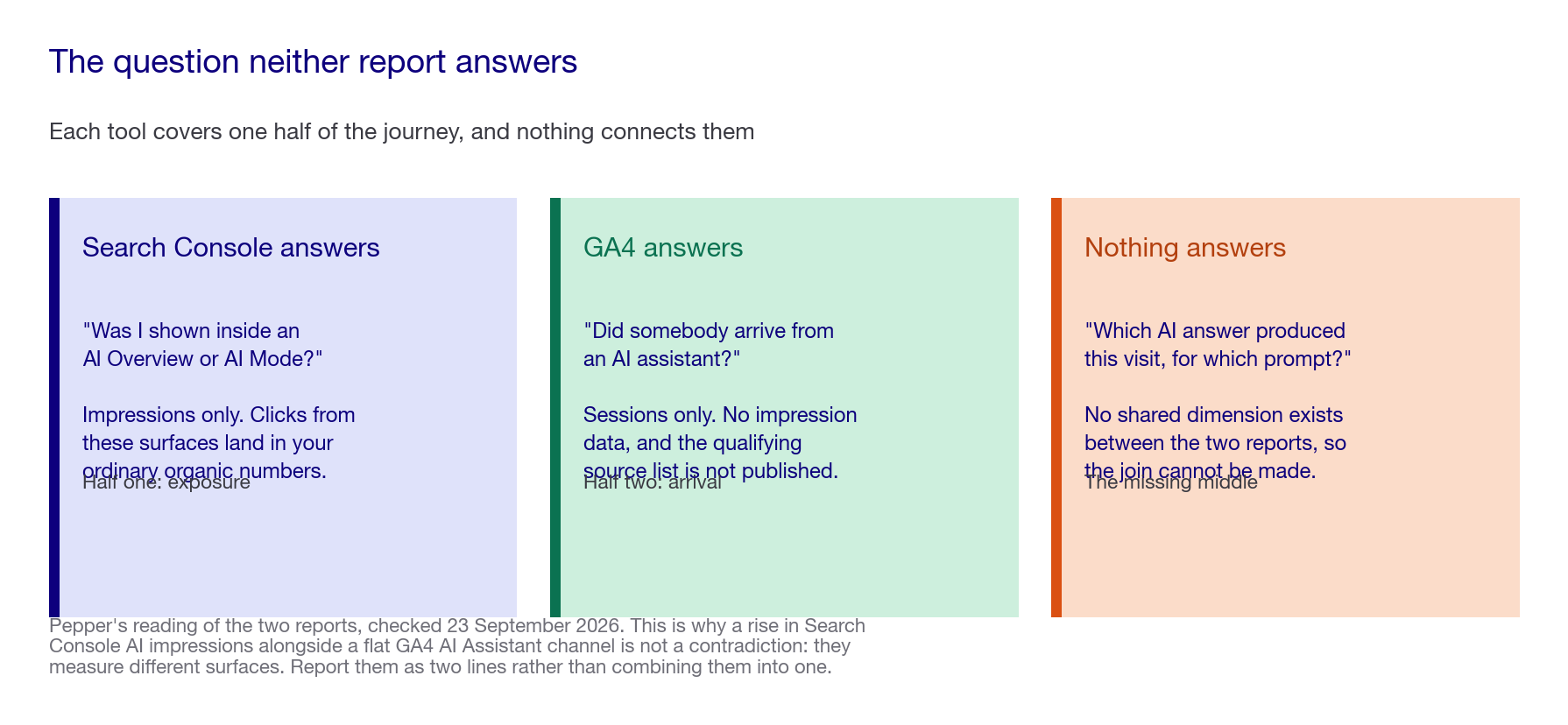
- Search Console is impressions on Google’s AI surfaces, with no clicks attached.
- GA4 is clicks from third-party assistants, with no impressions attached.
- Clicks from AI Overviews and AI Mode land in your ordinary organic numbers, not in the AI Assistant channel, because the referrer is Google Search.
- So a rise in Search Console AI impressions and a flat GA4 AI Assistant channel is not a contradiction. They are measuring different surfaces.
The practical instruction. Report them as two separate lines, never as one figure. Treating them as a single “AI traffic” number produces a figure that cannot be explained when someone asks what it is made of, which is the fastest way to lose a reporting conversation. We set out how to structure that kind of reporting in how to read an SEO report.
Step 4: Run the three sanity checks
Before you report any of this upward, check that the numbers mean what you think.
- The direct traffic check. Compare direct traffic before and after your AI visibility rose. Some assistants, particularly desktop and in-app browsers, strip the referrer, so a portion of AI-driven visits land in direct. A rise in direct alongside a rise in AI impressions is a signal, not a coincidence.
- The landing page check. Look at which pages the AI Assistant channel arrives on. If they are deep, specific pages rather than your homepage, the traffic is answer-driven and behaving the way AI referrals usually do.
- The behaviour check. AI referrals often arrive further along the buying process, because the assistant has already done the comparison. Which team owns acting on that is covered in the AI search team ownership model. Compare engagement and conversion rate against organic rather than assuming parity in either direction.
Where it falls short. All three are inferences, not proof. None of them isolates AI-driven demand cleanly, and we would not present any of them as attribution. They are sense checks that tell you whether a number is plausible.
Step 5: Build the reporting view you will actually use
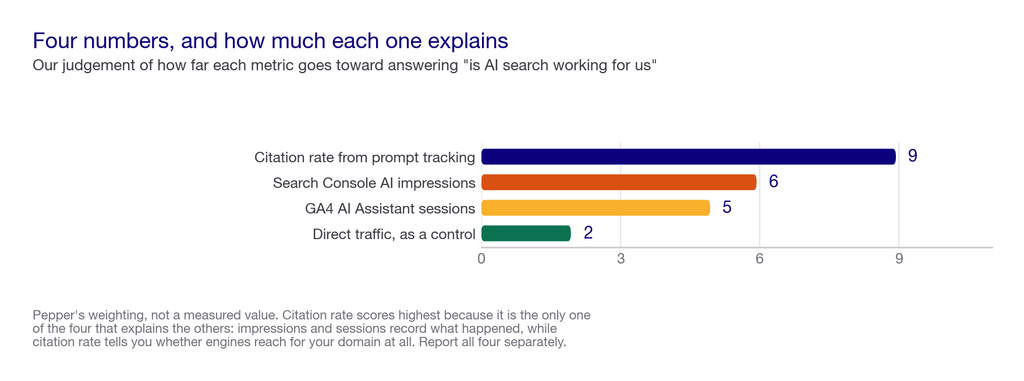
Four numbers, reported separately, refreshed monthly.
- AI impressions from Search Console, trended over time, broken out by page. This tells you which of your pages Google’s AI surfaces are showing.
- AI Assistant sessions from GA4, trended, broken out by landing page. This tells you which pages third-party assistants send people to.
- Direct traffic, trended alongside both, as a control rather than a claim.
- Your citation rate from prompt tracking, which is the only one of the four that tells you whether engines are citing your domain at all. The free and paid options for this are compared in top AI visibility platforms.
The fourth is the one that makes the other three interpretable. Impressions and sessions tell you what happened. Citation rate tells you why, and whether the gap between being mentioned and being cited is where your problem sits. That gap is the diagnosis, and our framework for it is Visibility, Citability and Retrievability.
If you want the wider survey of measurement approaches rather than this Google-specific setup, we tested five of them in how to track brand mentions in AI search.
What nobody should promise you
- A single AI traffic number. Google’s two reports measure different surfaces and do not join. Anyone presenting one combined figure should be asked what it is made of.
- Complete attribution of AI-driven demand. The largest path, where someone reads an answer and never clicks, is invisible to every tool here.
- An audited AI Assistant channel. Google does not publish which sources it counts, so neither we nor any vendor can tell you exactly what is inside that number.
- Click data from AI Overviews. The Search Console report is impressions only, by Google’s own description.
- That low referral numbers mean low visibility. Most AI answers resolve without a click, so the two are only loosely related.
Frequently asked questions
How do I know if AI search is sending me traffic?
Check two places. Search Console’s generative AI performance report shows impressions in AI Overviews and AI Mode. GA4’s AI Assistant channel shows sessions arriving from assistants like ChatGPT and Copilot. They measure different surfaces and do not join.
Does GA4 track ChatGPT traffic automatically?
Yes, through the AI Assistant channel in the default channel group. Google sets the medium to ai-assistant when the referrer matches its internal list of AI assistants. That list is not published, so the channel cannot be fully audited.
Reading the reports
Why does my Search Console AI report show no clicks?
Because it does not have a click metric. Google’s report is defined as impressions only: how many times links to your site were shown in a generative AI feature. Clicks from those surfaces land in your ordinary organic numbers instead.
Why can I not see the generative AI report at all?
Google states not all properties have access while it rolls out, and a site needs enough impressions in generative AI features to qualify. Sites that opted out of Search generative AI features are excluded from it.
Why is my AI Assistant channel showing almost nothing?
Check your channel ordering first. If you use a custom channel group, AI Assistants has to sit above Referrals, or the referral rule captures the traffic first. After that, remember most AI answers resolve without any click.
Interpreting the numbers
Is AI traffic showing up as direct traffic?
Some of it, yes. Certain assistants and in-app browsers strip the referrer, so those visits land in direct. Watch direct alongside your AI impressions as a sense check rather than treating either as attribution.
Should I combine Search Console and GA4 into one AI traffic figure?
No. One is impressions on Google’s own surfaces, the other is sessions from third-party assistants. Combining them produces a number you cannot explain when someone asks what it contains.
What is the most useful number to track?
Your citation rate from prompt tracking, because it explains the other two. Impressions and sessions tell you what happened, while citation rate tells you whether engines are reaching for your domain at all.
Sources
Google’s documentation was read directly on 23 September 2026. Where Google does not publish something, we say so rather than estimating.
Google documentation
- Google Search Console Help, Generative AI performance report (Search), checked 23 September 2026. Covers AI Overviews and AI Mode. Reports impressions, defined as “how many times links to your site were shown to a user in a generative AI feature,” with dimensions for pages, countries, dates and devices. States “Not all properties have access to the report, as we’re rolling out over time,” and that “Search Console doesn’t include data from experiments in Search Labs, as these experiments are still in active development.” Usual Search performance report limits apply, including the 1,000 row limit.
- Google Analytics Help, Default channel group, checked 23 September 2026. Defines AI Assistant as “the channel by which users arrive at your site from sources like ChatGPT, Gemini, Deepseek, Copilot, or Grok,” and specifies “The medium exactly matches ‘ai-assistant’. The medium is set to ‘ai-assistant’ and the campaign is set to ‘(ai-assistant)’ if the referrer matches a list of AI Assistants.” The list itself is not published.
- Google Search Central, AI features and your website, 15 May 2026. Places AEO and GEO inside SEO, and advises against providers guaranteeing rankings.
On what we could not verify
Google does not publish which referrers it counts as AI Assistants, so we cannot tell you exactly what the GA4 channel contains, and neither can any vendor. We also have no measured figure for how much AI-driven traffic lands in direct because of stripped referrers. The direct traffic check above is a sense check, not a measurement, and we have labelled it that way rather than attaching a number we could not defend.
Latest Blogs
Google now reports AI search two ways, and neither one joins to the other. Search Console shows impressions with no clicks. GA4 shows arrivals from a source list Google does not publish. Here is how to read both
You do not need a study to find out which sources AI cites in your category. You need forty prompts and an afternoon. Here is the procedure, and why the published figures are worth less than your own list.
A competitor benchmark in AI search measures your prompt set, not the market. Change the prompts and the ranking changes. Here is how to build one that survives that fact.
Get your hands on the latest news!