Are AI Overviews taking your clicks? How to tell, and what to do
The short answer
In short, yes on the available evidence, and by roughly half.
The Pew Research Center tracked the actual browsing behaviour of 900 US adults across 68,879 Google searches. Its findings are specific.
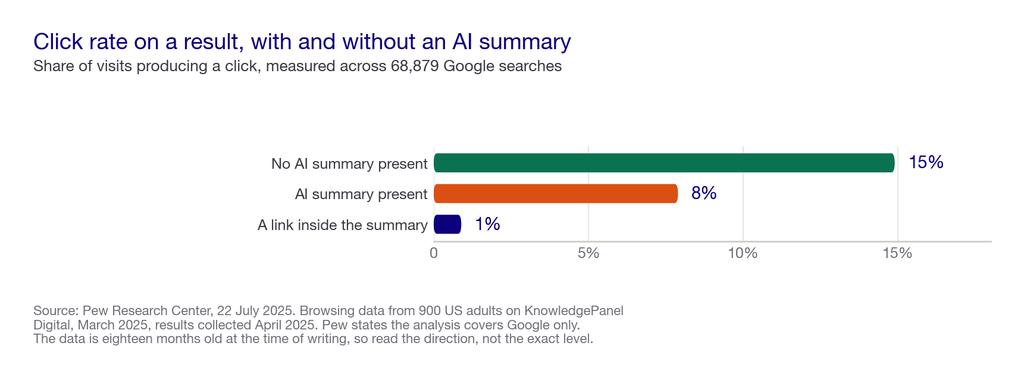
- Click rate with an AI summary present: 8%. Users who encountered one clicked a traditional search result in 8% of all visits.
- Click rate without one: 15%. Pew’s wording is that users without a summary clicked “nearly twice as often.”
- Clicks on links inside the summary: 1%. Users “rarely clicked on a link in the summary itself. This occurred in just 1% of all visits.”
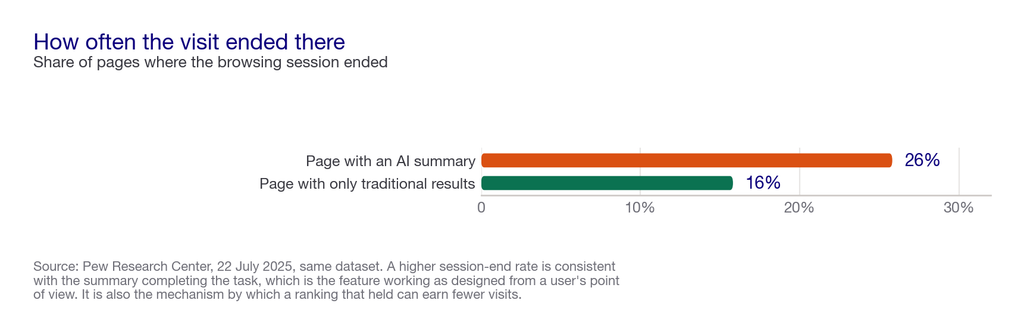
- Sessions ended more often. Browsing ended on 26% of pages with an AI summary, against 16% of pages with only traditional results.
- Frequency at the time: 18%. Some 18% of the Google searches in the study generated an AI summary.
Three caveats that matter as much as the numbers. The browsing data is from March 2025, so it is eighteen months old and AI features have changed since. It covers Google only, by Pew’s own statement of its technical limits. And it measures a US consumer panel, not your category.
So the honest position is that the direction is well evidenced and the magnitude for your site is not. Below is how to check your own.
We run this work daily. Pepper is an agentic organic growth engine, not an SEO agency. This page comes out of what we run: organic for more than 250 enterprises across eight years, more than 10 million tracked prompts, and the questions buyers put to us in client reviews. Customers log in and run the platform themselves, with a Pepper growth team attached. Book a growth audit and we will baseline what is actually happening on your pages.
Key takeaways
Key takeaways from the one independent study that measures this directly.
- Roughly half the click rate. 8% with an AI summary present against 15% without, across 68,879 searches.
- The summary’s own links get almost nothing. Just 1% of visits produced a click inside the summary.
- More sessions end. 26% of pages with a summary ended the browsing session, against 16% without.
- The data is from March 2025. Eighteen months old at the time of writing, on a fast-moving feature.
- It is Google-only and US-only, by the researchers’ own stated limits.
- Your own numbers are checkable. Search Console’s generative AI report plus your ordinary organic data will tell you more about your site than any study can.
What is zero-click search, and is this the same thing?
Zero-click search is any query answered on the results page itself, so the searcher never visits a site. The wider mechanics are in what is AI search. AI Overviews are one cause of zero-click, and not a new one: featured snippets, knowledge panels and weather boxes have done the same job for years.
But what is new is the scope. A snippet answers a narrow factual question. A summary can answer a comparison, a how-to or a shortlist, which are exactly the queries that used to send commercial traffic.
Where it falls short as a framing. Calling it zero-click implies the visit was owed to you. For a query like “what time is the match”, it never was. The useful version of the question is narrower: which of the queries that used to send you visits are now answered without one, and of those, which were ever going to convert?
What the research actually measured
So it is worth setting out properly, because the headline number gets quoted without its method.
The Pew Research Center analysed real browsing data from 900 US adults who are members of KnowledgePanel Digital, an online panel whose members install an app that tracks their browsing. The dataset contains 68,879 unique Google searches. Browsing data covers 1 to 31 March 2025, and Pew collected the search results between 7 to 17 April 2025.
Overall, that is a genuinely strong design for this question. It measures what people did rather than what they said, using a panel rather than a vendor’s customer base, from an organisation that sells nothing in this market.
The two limits Pew states itself. First: “Due to technical limitations in our ability to identify AI-generated summaries on other search engines, this analysis includes only Google searches.” Second: “The AI summary for any given search may change over time, and the results of this analysis reflect how search results appeared at the time they were collected.”
The limit we would add. March 2025 is a long time ago for this feature. AI Mode has since become a separate surface, Search Console has added a generative AI report, and the frequency of AI summaries will not have stood still. Treat the 8% against 15% as well-evidenced direction, not as this quarter’s number.
What the numbers mean, read carefully
In short, three readings are fair from this data, and one common reading is not.
First, the click opportunity halves when a summary appears. 8% against 15% is the cleanest finding in the study, and it is measured behaviour.
Second, the summary’s links are not a comfort prize. At 1% of visits, a citation inside an AI summary generated a click far less often than a traditional result did. Being cited is worth having for reasons other than clicks.
Third, summaries end sessions. 26% against 16% suggests the summary more often completes the job, which is the whole point of the feature from a user’s perspective.
Not fair: “AI Overviews cost us X% of traffic.” The study measures click rate per visit on a US consumer panel, not the traffic of any particular site in any particular category. Applying 8% against 15% to your own numbers borrows somebody else’s denominator, which is exactly the move we warn against in our GEO ROI model.
How to tell what is happening on your own site
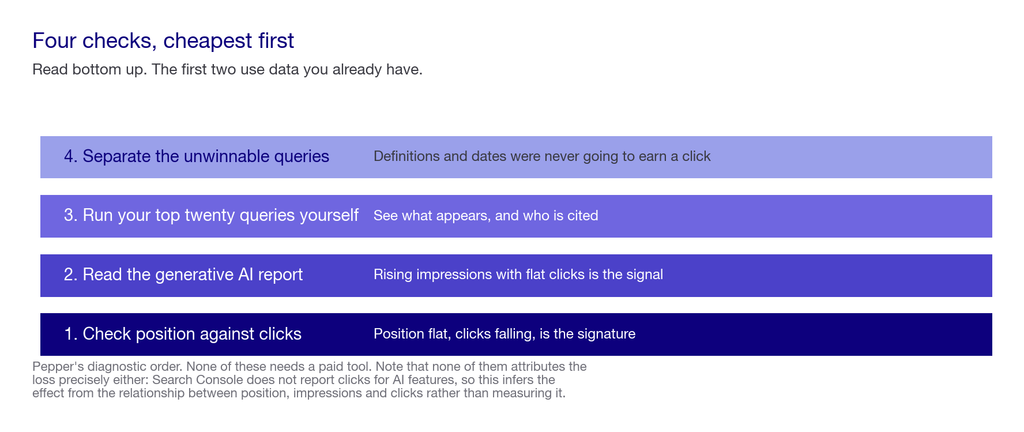
Here are four checks, in order of how much they actually tell you. None requires a paid tool.
Check one: does your ranking-to-traffic relationship still hold?
First, pull position and clicks for your top queries over a long window. How to read that relationship properly is in how to read an SEO report. The signature of this problem is specific: position flat or improving, impressions flat or up, clicks falling.
If clicks fell while position fell too, you have an ordinary ranking problem and this page is not your answer.
Check two: read the generative AI report in Search Console
Meanwhile, Google now publishes a generative AI performance report covering AI Overviews and AI Mode. It reports impressions only, defined as “how many times links to your site were shown to a user in a generative AI feature.”
Rising impressions there alongside flat organic clicks is the clearest available signal that you are being shown inside AI features without being clicked. The report’s limits, no clicks and no query filtering, are covered in how to know if AI search is sending you traffic.
Check three: run your own top queries and look
Then take your twenty most valuable queries and run them, using the methods in how to track brand mentions in AI search. Note whether an AI Overview appears, whether you are cited in it, and which sources are. This is a twenty-minute job and it tells you something no report will: whether the summary answers the question so completely that a click would be redundant.
Check four: separate the queries where a click was never likely
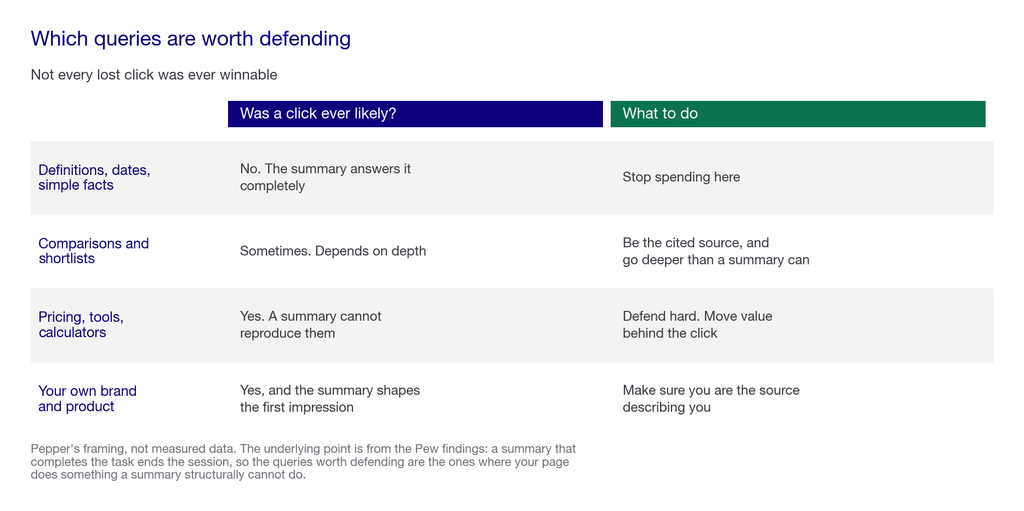
Not all lost clicks are worth mourning. A query whose answer is a definition, a date or a number was always going to end on the results page. So the queries worth defending are the ones where your page does something a summary cannot: a comparison, a tool, a price, a demo.
What to do about it
Finally, five responses, roughly in order of how much they return.
- Check your preview controls. The
nosnippet,data-nosnippetandmax-snippetdirectives limit how your content can appear in Google’s AI features. A tightmax-snippetyou set years ago may work against you now, and this takes minutes to check. - Move value behind the click. If the whole answer is on the page above the fold and in the summary, there is nothing left to click for. Calculators, comparisons, current pricing, tools and in-house data are things a summary cannot copy.
- Aim to be the cited source, not just present. The gap between being named and being cited is the whole diagnosis, set out in Visibility, Citability and Retrievability. Citation does not convert like a click, but it is the thing that puts your name in the answer, and brand presence in an answer has value a click-through report will never capture.
- Re-weight your reporting. Impressions and citation share become leading indicators when clicks stop being the whole story. We set out the metric set in AI search visibility metrics and KPIs.
- Stop optimising the queries that were always going to be answered. Redirect the effort to questions with a decision behind them.
Where this advice falls short. Still, none of it restores the click. The honest position is that some queries you used to win traffic on are now answered without a visit, and the response is to compete where a visit is still necessary rather than to try to reverse the feature. Anyone selling you the reversal is selling something Google does not offer.
What nobody should promise you
- A percentage of traffic you will get back. Nobody can attribute your losses to AI Overviews precisely, because Search Console does not report clicks for these features.
- Exclusion from AI Overviews without cost. You can limit appearance through preview controls, and that limits your ordinary snippets too.
- That the 8% against 15% figure applies to you. It is a US consumer panel from March 2025, measuring Google only.
- A guaranteed citation inside an Overview. Google states there are no additional requirements or special optimisations for appearing in these features, which also means no lever exists to sell.
- That this is reversible. Google made a product decision here. The response is to compete where a click is still needed.
Frequently asked questions
Are AI Overviews reducing website clicks?
On the available evidence, yes. Pew Research Center found users clicked a traditional result in 8% of visits where an AI summary appeared, against 15% where none did, across 68,879 Google searches.
How much traffic do AI Overviews cost?
Nobody can tell you for your site. The research measures click rate on a US consumer panel, not any particular site’s traffic, and Search Console does not report clicks for AI features. Check your own ranking-to-click relationship instead.
Reading the research
How reliable is the Pew study?
The design is strong: real browsing behaviour from 900 US adults, 68,879 searches, from an organisation with no product in this market. Its own stated limits are that it covers Google only and reflects results as they appeared when collected.
Is the data still current?
The browsing data is from March 2025, so it is eighteen months old on a fast-moving feature. Treat the direction as well evidenced and the exact magnitude as dated.
Do people click the links inside an AI Overview?
Rarely. Pew found clicks on a link within the summary occurred in just 1% of all visits, which is why being cited should be valued for brand presence rather than for referral traffic.
Checking your own site
How do I tell if AI Overviews are affecting me?
Look for position flat or improving while clicks fall. Then check Search Console’s generative AI report for rising impressions alongside flat organic clicks, and run your top twenty queries yourself to see what appears.
Should I block AI Overviews?
Rarely worth it. The preview controls that limit AI appearance also limit your ordinary search snippets, so the cost usually exceeds the benefit. Check what your current directives already do first.
What should I do about the queries I am losing?
Move value behind the click, with things a summary cannot copy: calculators, current pricing, comparisons, in-house data. And stop spending on queries whose answer was always going to end on the results page.
Sources
The research below is independent and non-commercial. Google documentation was read at source.
Independent research
- Pew Research Center, Google users are less likely to click on links when an AI summary appears in the results, 22 July 2025. Browsing data from 900 US adults on KnowledgePanel Digital, 68,879 unique Google searches, browsing 1 to 31 March 2025 and search results collected 7 to 17 April 2025. Finds users with an AI summary “clicked on a traditional search result link in 8% of all visits” against “15% of visits” without; that clicking a link in the summary itself “occurred in just 1% of all visits”; that “18% of all the Google searches in our study generated an AI summary”; and that browsing ended on “26% of pages with an AI summary, compared with 16% of pages with only traditional search results.” Pew states the analysis “includes only Google searches” and that results “reflect how search results appeared at the time they were collected.” Pew Research Center is a non-partisan research organisation with no product in this market.
Google documentation
- Google Search Console Help, Generative AI performance report (Search), checked 29 September 2026. Covers AI Overviews and AI Mode, reporting impressions defined as “how many times links to your site were shown to a user in a generative AI feature,” with no click metric and no query-level filtering.
- Google Search Central, AI features and your website, checked 29 September 2026. Source of the preview controls, and of the statement that there are “no additional requirements to appear in AI Overviews or AI Mode, nor other special optimizations necessary.”
On what is not known
There is no published figure for how much traffic AI Overviews cost any particular site or category, and we have not invented one. Search Console does not report clicks for AI features, so the credit cannot be made directly even with your own data. The checks in this article infer the effect from the relationship between position, impressions and clicks, which is the best available method rather than a measurement.
Latest Blogs
Two Google AI features, two different jobs. One appears above results when it adds something; the other replaces the results page entirely. What Google says about each, and what changes for your pages.
Independent research found people click a result 8% of the time when an AI Overview appears, against 15% when one does not. Here is the evidence, its limits, and how to tell what is happening on your own site.
Twelve technical checks you can run on your own site today, in dependency order. Most take minutes, several are free, and the first four decide whether the rest matter at all.
Get your hands on the latest news!