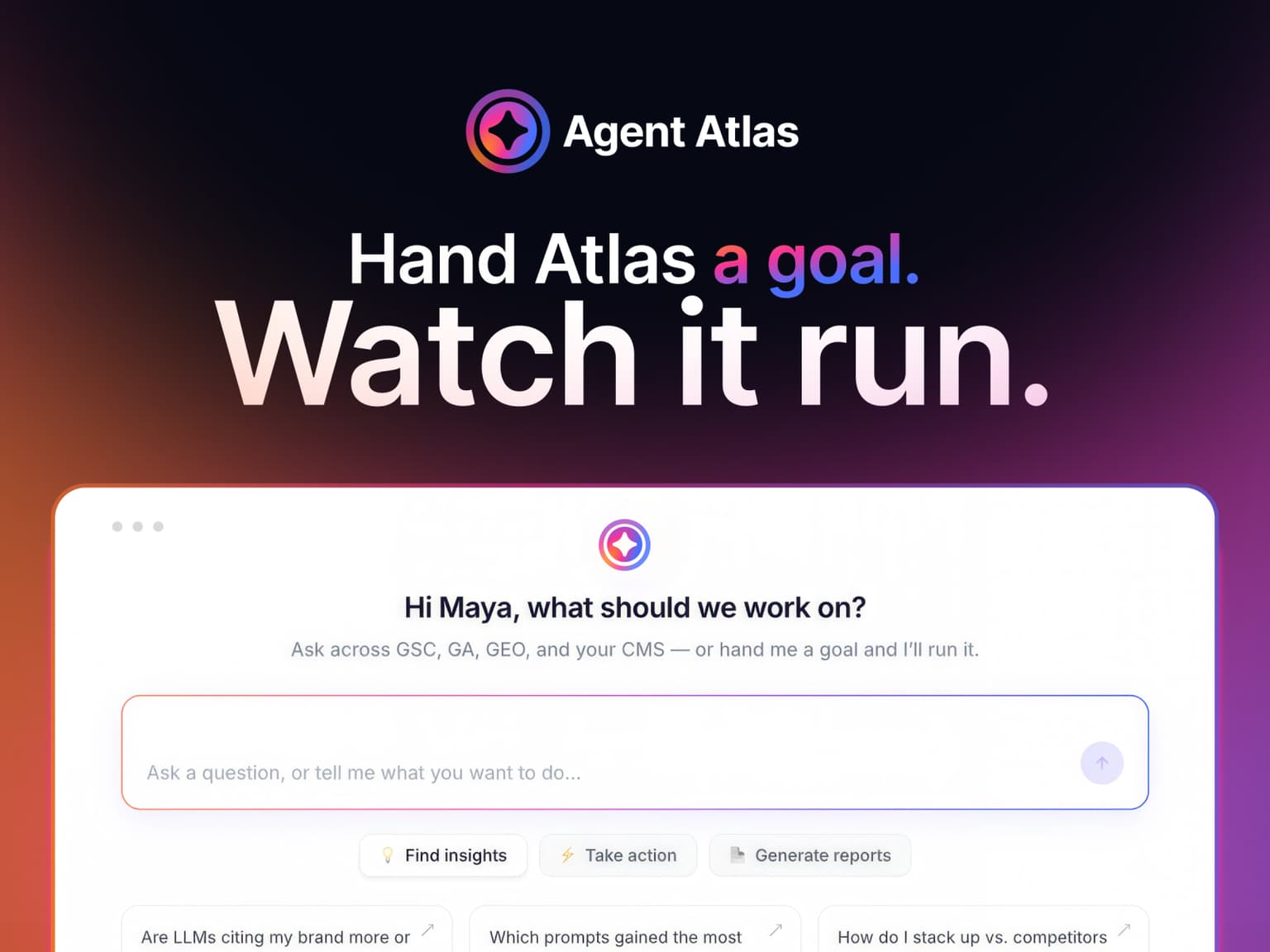
Most marketing platforms hand you a dashboard and leave the work to you. Agent Atlas is the layer that does the work, and this page sets out exactly what that means in practice, including the parts version one does not cover.
The short answer
Agent Atlas is the chat-first layer of Pepper’s platform. You ask a question in plain language, it reasons across every data source you have connected, answers with the reasoning attached, and runs the workflow that acts on the answer.
Three things make it different from a dashboard with a chat box bolted on.
- It orchestrates rather than routes. A router sends a rankings question to one pipeline and a visibility question to another, and each only ever sees its own data. Atlas pulls from any combination of sources to answer one question, which is what questions like “what should I prioritise this quarter” actually require.
- It does not stop at the answer. Every analytical response carries a recommended next action, and each recommendation maps to a specific workflow and a specific output.
- You run it. Customers log in, connect their own sources and work the product themselves, with a Pepper growth team attached to the account alongside them.
One naming point before anything else, because it causes real confusion. Atlas is Pepper’s GEO platform. Agent Atlas is the chat-first agent layer that sits on top of it. Coverage of the platform launch and coverage of the agent launch are two different announcements, months apart.
Pepper is an agentic organic growth engine. This page comes out of what we run: organic for more than 250 enterprises across eight years, more than 10 million tracked prompts, and the questions buyers put to us in client reviews. Book a growth audit and you can ask Atlas your own questions against your own data.
Key takeaways
Key takeaways from Pepper’s own product documentation and the live product page.
- It is a chat-first layer, not a separate tool. One conversation replaces navigating between GEO tracking, Search Console, Analytics and your CMS.
- Two sources are on from day one. GEO tracking is always on, and DataForSEO runs through Pepper’s own credentials. You connect Search Console, Analytics and your CMS yourself.
- Capability compounds with connections. GEO alone answers AI-visibility questions. Adding Search Console, Analytics and a CMS widens what a single question can reason across.
- Output arrives as artifacts. Insights for analysis, Sheets for bulk runs, and the Workflow Builder when no existing workflow fits.
- Artifacts are agent-generated. In version one they are produced by Atlas rather than edited by you, and exports are PDF or HTML.
- CMS publishing in version one is WordPress. Reading content metadata works across all three supported systems.
What is Agent Atlas, and what problem does it solve?
Agent Atlas is the chat-first intelligence layer of Pepper’s platform. It answers questions in plain language by reasoning across your connected data, then runs the work its answer recommends.
The problem it removes is a specific and boring one. Before it, getting a straight answer meant opening several screens: GEO tracking for AI-search visibility, Search Console for rankings, Analytics for conversions, competitive data for the landscape, and your CMS for the content itself. You checked each, connected the dots in your head, then went and triggered the work by hand.
The valuable questions are cross-source by nature, and no single screen can answer them.
- “What should I prioritise this quarter?”
- “Where is my biggest opportunity?”
- “Traffic dropped this week, what happened?”
- “What is the ROI of fixing these pages?”
Each of those needs visibility data, ranking data, conversion data and content metadata read together. That is the job.
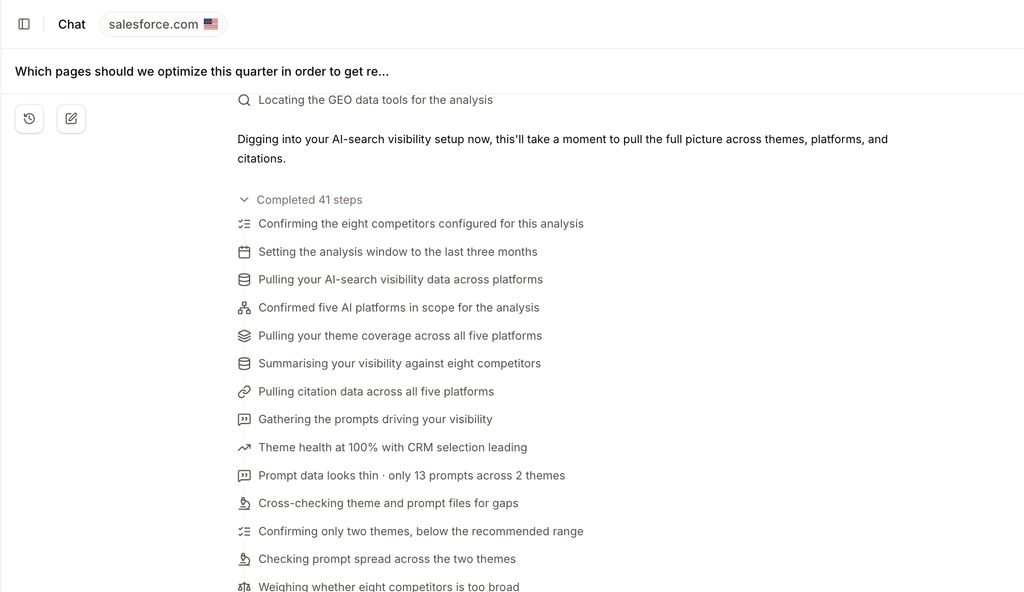
Where it falls short. Atlas reasons over what it can reach. If you have connected only GEO tracking, it will answer AI-visibility questions well and cannot answer conversion questions at all. The quality of the answer is bounded by the sources you have connected, and no amount of phrasing gets around that.
What Agent Atlas connects to
Two sources are available immediately. Three you connect yourself, and each one widens what a single question can reason across.
On from day one.
- GEO tracking. Always on, no connection required. You can ask about AI-search visibility straight away.
- DataForSEO. Available automatically through Pepper’s own credentials, adding competitive pressure and backlink authority data. No action needed from you.
What you connect.
- Google Search Console, through a one-time sign-in. Adds ranking data, click and impression analysis, and coverage detail.
- Google Analytics, through a one-time sign-in. Adds conversion data, traffic sources and session analytics.
- Your CMS. Adds content metadata and page-level detail. In version one, reading works across all three supported systems and publishing is WordPress.
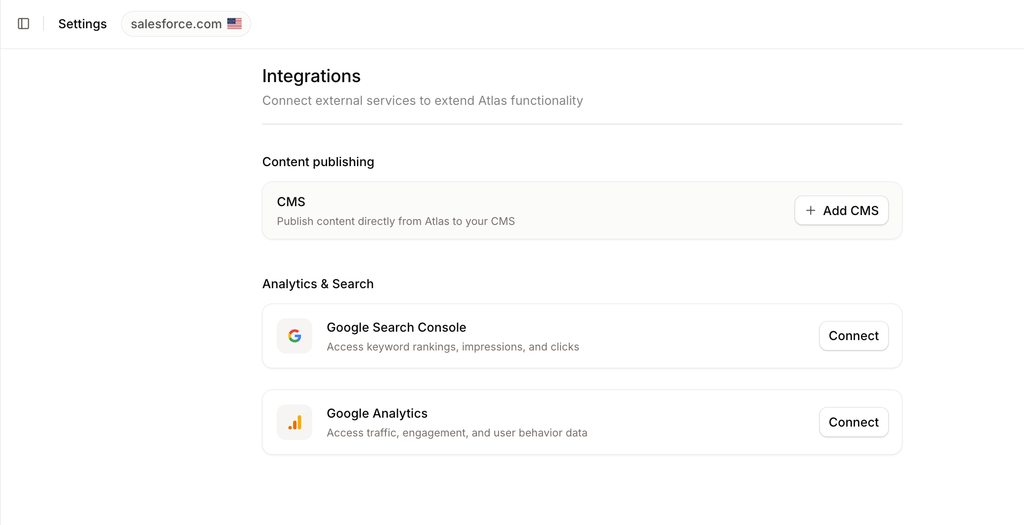
Why this matters more than it sounds. Adding Analytics does not just add a conversion report. It changes the ranking of every recommendation, because pages that drive business outcomes start outweighing pages that merely get traffic. The engines Atlas tracks are named on the platform page: ChatGPT, Perplexity, Gemini, Copilot, Claude and Google AI Overviews.
How a conversation actually works
Five steps, and the loop is the product.
- Ask. You pose a question or a request in plain language.
- Clarify. If a good answer depends on your goal or scope, Atlas asks one focused question before it runs, in a form-style prompt rather than an open-ended back-and-forth.
- Answer and recommend. Atlas delivers the insight with its reasoning, then tells you what to do about it. It does not stop at the data.
- Act. You pick a recommended action and Atlas runs the workflow that carries it out.
- Continue. The conversation keeps its memory, so you can refine, follow up or start a new thread.
Where it falls short. The general method above is what Atlas follows, but it is not rigidly deterministic. A given question will not always produce exactly this sequence in exactly this format, and a run may produce more output objects than you expected. Treat the loop as the shape of the interaction rather than as a guaranteed script.
Chat and canvas: where output goes
The default screen is a single centred chat. When an answer is richer than a sentence or two, a canvas slides in from the right to hold the detail while the chat keeps the narrative.
For simple responses, a number, a short explanation, a yes or no, no canvas opens at all and the answer lives entirely in the chat.
The artifacts Atlas produces
Rich output takes one of a small number of shapes, which is what makes the product predictable.
- Insights. Analytical output: a single scrollable page with the summary at the top, detail in the middle and supporting context at the bottom. This is what you get when you ask “which pages should I optimise” or “why did traffic drop”.
- Sheets. The display form for a bulk run, one row per item processed. Worth understanding precisely: a Sheet is a way of showing you results, created after the run completes, rather than the run itself.
- The Workflow Builder. The surface for building or editing a workflow, which opens when no existing workflow fits what you asked for.
- Documents. Where a single output is better read as a document than a table. Exports are PDF or HTML.
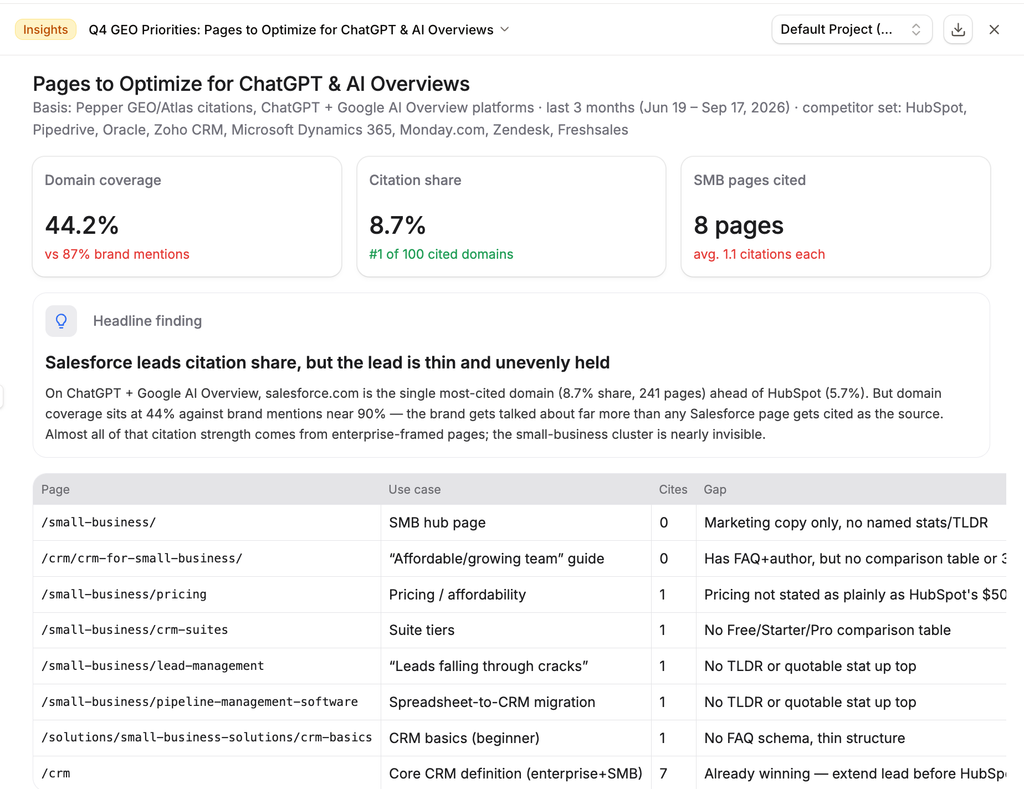
The important detail about artifacts in version one. They are generated by the agent rather than edited by you. They are not interactive: you do not click into a row to open it, and you do not edit the output in place. If you want something changed, you ask Atlas to change it.
That is a real constraint and worth knowing before you plan a workflow around it. It is also a deliberate one: everything on the canvas is the agent’s output, with its provenance attached, rather than a document that two different authors have been editing.
Workflows and recommended actions
This is the part that separates Atlas from a dashboard with a chat box.
A workflow is a saved, executable unit of work: generating a content brief, auditing a page, drafting a rewrite. Every workflow is callable from chat, and you never navigate to a separate screen to run one.
Running one. You either ask for it directly or accept a recommended action. Atlas collects any required inputs, runs the work, and shows the output on the canvas. A bulk run across many URLs usually returns a Sheet, and in practice a run with five or more outputs will typically be shown that way.
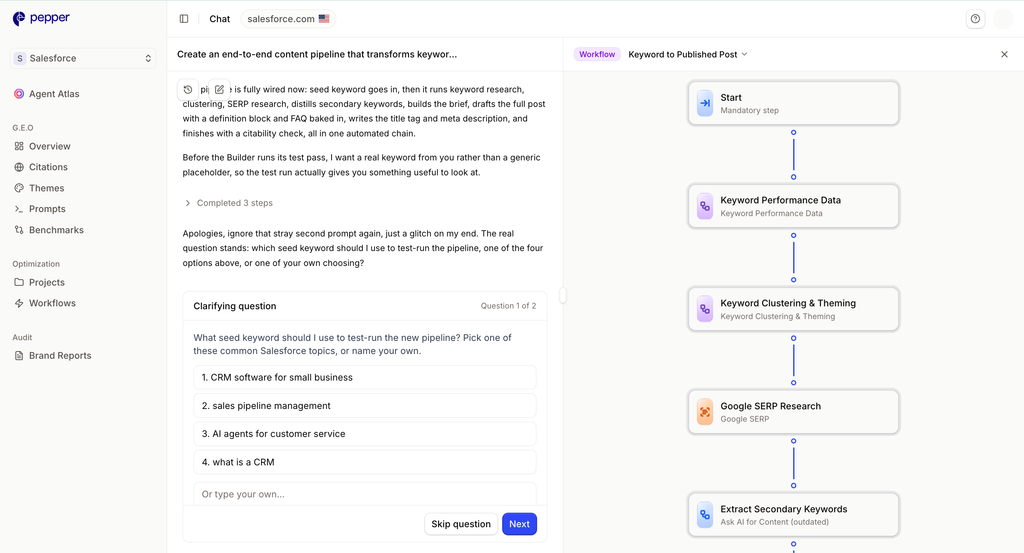
Building one. When a task needs a workflow you do not have, the Workflow Builder opens, either because you asked for it explicitly or because nothing existing fitted. You describe what you want in plain language rather than starting from a blank canvas.
Recommended actions are how an answer becomes work. After Atlas delivers an analysis, actions appear in the chat as clickable options, ordered by estimated impact. Each one names the action, the pages or keywords it applies to, the workflow that will carry it out, and the artifact you will get back. You can take one, chain several, or ignore them and ask something else.
Projects: where work is kept
Sessions are conversational and meant to be temporary. Projects are the durable home for the artifacts and workflows you want to keep and reuse.
Any artifact you generate can be added to a Project. In version one, moving an artifact between Projects is something a person does rather than something you ask Atlas to do.
What version one does and does not do
We would rather set this out plainly than have you discover it in a demo. Everything here comes from Pepper’s own product documentation.
| Area | What version one does | What it does not do |
|---|---|---|
| CMS | Reads content metadata across all three supported systems | Publishing is WordPress only |
| Artifacts | Generated by the agent, with provenance attached | Not editable by you, and not interactive |
| Sheets | Show the results of a bulk run after it completes | No clicking into a row to open it on its own |
| Exports | PDF or HTML | No DOCX export |
| Projects | Durable home for artifacts and workflows | Moving artifacts between Projects is manual |
From Pepper’s own product documentation and the product team’s corrections of 10 August 2026. These are version one boundaries rather than permanent ones.
- CMS publishing is WordPress in version one. Reading content metadata works across all three supported systems.
- Artifacts are agent-generated and not user-editable. You ask Atlas to change something rather than editing it yourself.
- Artifacts are not interactive. There is no clicking into a row of a Sheet to open it as its own document.
- Exports are PDF or HTML. There is no DOCX export.
- A Sheet is a display method, not the run. It is created after the workflow completes, when Atlas puts the results into it to show you.
- A single request may produce more than one object. Two Sheets, or documents as well as a Sheet, depending on what the work produced.
- Moving artifacts between Projects is manual. A person does it, not the agent.
Why we publish this. A guide that describes the fuller product we are building rather than the one that ships today would waste your time twice: once when you buy on it, and again when you plan around it. These are version one boundaries, not permanent ones.
How Agent Atlas relates to Atlas, the platform
Worth separating, because the two names get used interchangeably and they are not the same thing.
Atlas is Pepper’s GEO platform. It runs the prompts your buyers actually ask across AI engines, refreshes them continuously, and benchmarks results against your competitive set. Its reporting covers brand visibility, how often engines name you, and domain coverage, how often your own pages surface for buyer prompts, both tracked against rivals, plus the sources AI is citing to describe you. The wider tool market is compared in top AI visibility platforms.
Agent Atlas is the chat-first agent layer on top of that platform, plus your other connected sources. It was announced separately and later.
If you are trying to understand the measurement side rather than the agent, our framework for it is Visibility, Citability and Retrievability, and the metric definitions are in AI search visibility metrics and KPIs. For the launch narrative rather than the reference, the announcement is in Agent Atlas: ask one question, get the work done.
Who Agent Atlas is for, and who it is not for
Being useful here means being honest about fit.
- A team with several connected sources and nobody to join them up. This is the core case. The value is in cross-source reasoning, and it needs sources to cross.
- A team doing repetitive work at volume. Briefs, audits, rewrites across many URLs. Bulk runs are where the time comes back, and the content planning that feeds them is in our SEO content plan template.
- A team that will act on the output. The recommended action is the point. A tool that recommends work nobody does is a more expensive dashboard, which is why we set out who should own this work.
Where it falls short as a fit. If you have only GEO tracking connected and no intention of connecting anything else, you are buying a narrower product than the one described here. And if your programme is small enough that one person could run the queries by hand in an afternoon, the honest answer is that you do not need an agent yet. Our comparison of buying a platform against hiring a team covers that decision properly.
What nobody should promise you
- A guaranteed citation in an AI answer. Nobody controls what a model outputs, and Atlas does not change that.
- A guaranteed ranking. Google’s own guidance warns against providers who guarantee rankings.
- A single AI visibility score that tells you what to do. We report brand visibility and domain coverage separately, because the gap between them is the diagnosis.
- That an agent removes the need for judgement. Atlas ranks and recommends. Deciding what your business should do with that remains yours.
- Features from a roadmap described as though they ship today. The version one scope above is what exists now.
Frequently asked questions
What is Agent Atlas?
The chat-first layer of Pepper’s platform. You ask a question in plain language, Atlas reasons across your connected data sources, answers with its reasoning attached, and runs the workflow that acts on the answer.
How is Agent Atlas different from Atlas?
Atlas is Pepper’s GEO platform, which tracks the prompts your buyers ask across AI engines and benchmarks you against competitors. Agent Atlas is the chat-first agent layer on top of it, announced separately and later.
Setup and data
What data does Agent Atlas need?
GEO tracking and DataForSEO are available from day one with no setup. You connect Google Search Console, Google Analytics and your CMS yourself, each through a one-time sign-in, and every connection widens what a single question can reason across.
Can Agent Atlas publish to my CMS?
In version one, publishing is available for WordPress. Reading content metadata works across all three supported systems, so Atlas can reason about your content even where it cannot publish to it.
Which AI engines does it track?
The platform page names ChatGPT, Perplexity, Gemini, Copilot, Claude and Google AI Overviews. Tracking runs continuously rather than as one-off checks, which is what makes trend data readable.
Using it
Can I edit what Agent Atlas produces?
Not directly in version one. Artifacts are generated by the agent rather than edited by you, and they are not interactive. If you want a change, you ask Atlas for it in the conversation.
What formats can I export?
PDF or HTML in version one. There is no DOCX export, which is worth knowing early if your reporting process depends on editable Word files or if a stakeholder expects to mark up a draft in Word before it goes anywhere.
Do I run Agent Atlas myself, or does Pepper?
You do. Customers log in, connect their own sources and work the product themselves, with a Pepper growth team attached to the account doing work alongside them rather than instead of them.
Sources
Product detail comes from Pepper’s own documentation and live product pages, checked 24 September 2026. Where something is a version one boundary rather than a permanent one, we say so.
Pepper product sources
- Pepper, Agent Atlas product page, checked 24 September 2026. Source of the connected sources, the tracked engine list, the export formats and the credibility figures: 250-plus enterprises, more than 10 million prompts tracked, eight years.
- Pepper, the Agent Atlas launch post, 26 August 2026. The launch announcement, written by Anirudh Singla. Narrative rather than reference.
- Pepper internal product documentation for Agent Atlas version one, including the product team’s corrections of 10 August 2026. Source of every version one boundary listed above: the WordPress-only CMS write, artifacts being agent-generated and non-interactive, PDF and HTML export, the Sheet as a display method created after a run, and manual movement of artifacts between Projects.
Media coverage
- Forbes India Brand Connect, “Pepper Launches Atlas, The GEO Platform For Enterprise AI Visibility”, July 2026. Covers the platform launch rather than the agent. Brand Connect is Forbes India’s branded content section, so read it as Pepper’s own material placed with a publisher rather than as independent editorial.
Google documentation
- Google Search Central, AI features and your website, 15 May 2026. Places AEO and GEO inside SEO, and advises against providers guaranteeing rankings.
On what this page is
This is Pepper’s own product documentation written as a guide, so read it as a first-party description rather than an independent review. We have described version one as it ships rather than the fuller product in our internal drafts, and where the two differ we have followed the product team. Capabilities change, so check the product page for the current position before relying on any specific detail here.
Latest Blogs
Yes, and it will not show up in your pipeline report. Those two statements are not in tension, they are the same fact stated twice. A survey of more than 1,000 B2B software buyers found 82% had sourced software recommendations from an AI chatbot in the last two years, and about half said AI mattered most when they were narrowing and comparing options. That is precisely the stage that produces no click. Meanwhile the conversion multiples circulating for AI traffic run from 22% better than organic to five times better, and the only peer-reviewed study says worse. Here is how to tell which is true for you.
Agent Atlas is the chat-first layer of Pepper’s platform: you ask in plain language, it reasons across your connected sources, and it runs the work. Here is exactly what it does, and what V1 does not.
The short answer The fork is who the buyer is, and it changes everything about what you should be buying. Both are legitimate, and the wording problem underneath them is one we traced in AEO, GEO, AIO and LLMO explained. They are not swaps, and a list that ranks them together is comparing an Indian […]
Get your hands on the latest news!